
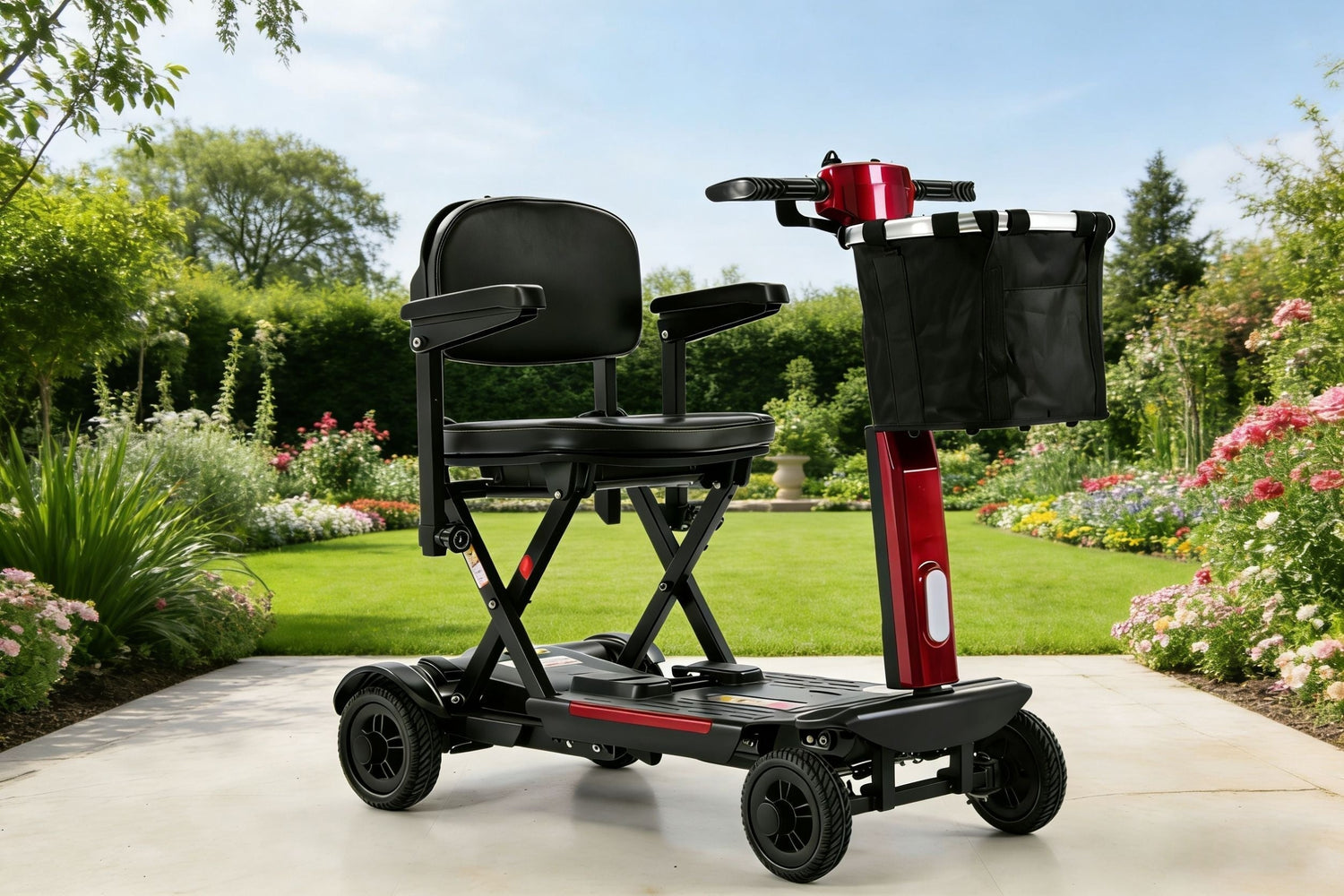
MS02-F Mobility Scooter Operating Manual
 CATALOGUE
Ⅰ. Safety Operation........4
Ⅱ. Instructions........7
III. Folding and unfolding.....11
IV. Charging and maintenance of battery .......12
Ⅴ.Maintenance and Care......13
Ⅵ.SAFETY........14
Ⅶ.WARRANTY ........... 19
Ⅷ.PARTS ORDER INFORMATION ........ 20
Ⅸ. PERFPRMANCE PARAMETER ....... 20
Ⅹ.COMMON FAULT AND ELIMINATING METHODS ...... 21
I. Safety Operation
Before using the electric mobility scooter for the first time, please readthis section carefully and understand all precautions to ensure safe,.comfortable, and free driving of the scooter. This is very important foryou. If you have any questions, please contact your dealer
Before Operation:
1. Familiarize Yourself with Local Traffie Regulations
The electric mobility scooter is classified as a non-motor vehicle.According to traffic laws, a driver's license is not required, but you mustobey traffic regulations just like pedestrians. Please use pedestriancrossings or non-motorized lanes. When driving along the roadside, donot suddenly cross the road diagonally.
2. Practice Operation
Before operating the electric mobility scooter for the first time.familiarize yourself with its various functions. Practice moving forward.accelerating, decelerating, stopping, reversing, climbing, descending, andturning in a place with few people, good ground conditions, and safesurroundings. Only take it on the road once you have mastered theseoperations. Before your first use, check the condition of the scooterensuring the brakes are responsive, all functions are normal, and thebattery is adequately charged.
Warning:
Never expose the electrical system of your electric mobility scooter todamp environments for extended periods (e.g., rain, snow). Do not wash the scooter body directly with water. Ifit gets wet, ensure it is dry and fault-free before use.
Do not operate the scooter in adverse weather conditions such as rain snow, fog, strong winds, or extreme temperatures. Avoid driving in deserts, beaches, muddy areas, or on wet, icy, or slippery surfaces to prevent performance issues and accidents
Do not operate the scooter under the influence of alcohol, when overlyfatigued, or in a state of confusion. If the operator has a mental illness orany condition that might cause sudden loss of control, do not drive thescooter.
·During Operation:
1. This electric mobility scooter is limited to one person. Do not carrypassengers. The scooter should not be used for transporting or towinggoods.
2. Do not stand while driving the scooter. The operator must sit on theseat and hold the handlebars firmly. Avoid serpentine driving, sharp turns at high speeds, and shifting your body to prevent tipping.
3. Pay close attention and reduce speed when driving on uneven orcomplex roads and in congested areas. Do not use mobile phones or other wireless communication devices while driving. Stop the scooter in a safe place and turn off the power before using such devices.
4.When reversing, pay attention to the surroundings and move slowly.When exiting rooms or elevators, move slowly and do not use escalatorsfor going up or down.
5.When climbing or descending slopes, stay highly attentive, grip the
handlebars firmly, and proceed straight at low speed. Do not forcefullyclimb slopes that exceed the scooter's limit. Avoid crossing obstacles or
steps higher than 8 cm, as this may impede the scooter's movement.6.When driving through an intersection, please obey traffic rules, do notrun a red light, stop and observe first, and then drive slowly when thelight tumns green.
7. Do not intentionally open or close the electric door lock frequently, anddo not start or stop the electric scooter frequently.8. Do not lend the electric scooter to people who have never used or arenot familiar with the electric scooter for use and operation, and do not letchildren play with the switch and the operating handle."
After operation:
1. After parking, please turn off the electric door lock when no one isthere, and do not leave the key on the electric door lock.
2. If you do not use the electric scooter for more than l week, pleasedisconnect the battery.
Ⅱ. Instructions
(1)Display Function Instructions:
Please see the follow picture:

1. Electric lock
Control the power on and off of the scooter.
2. Driving Lever
Control the scooter's forward, reverse, acceleration, deceleration, and parking. After turning on the electric door lock, Use your right hand to pull the lever backward on the right side of the instrument, and the scooter will move forward. The greater the angle, the faster the speed.Slowly release the lever and the scooter will decelerate. When it is fully released and the lever is reset, the scooter will stop and be in the braking state. Similarly, use your left finger to pull the lever backwards on the left side of the instrument, and the scooter will move backwards. The greater the angle, the faster the speed. Slowly release the lever and the scooter will decelerate. When it is fully released and the lever is reset, the scooter will stop and be in the braking state.
3. Speed adjustment knob
Adjust the maximum speed of the scooter. Turn clockwise to increase the speed gradually, and turn counter-clockwise to decrease the speed gradually.
4. Headlight button
Press this button to turn on the headlights, and press it again to turn off the headlights.
5. Horn
Press this button to sound the horn.
6. Display
Turn on the power switch, the screen will show the battery power, driving speed, total mileage, a full bar means the power is strong, a half bar means the power is very low and the battery must be charged in time.
Other functions and introduction:


·Notice: Switch button for brake
Control clutch and release of brake could switch to“electric driving ” and “manual driving ”.
“ Electric driving": When the brake button is switched to the ‘electric ’ position, the scooter is in the braking state,cannot be pushed, at this time the scooter can be electric driven normally.
“ Manual driving": When the brake button is switched to the ‘manual ’ position, the scooter is in the state of brake release, and the scooter can be pushed. (Notice: This function can only be activated when the power is on and the system is in standby mode. The scooter cannot be driven during this time)When going downhill, do not switch the brake lever to the "manual" position, entering the "Manual driving" mode, as there will be no braking effect at this time. This is to ensure the safety of the user and the mobility scooter.
·Charging port
Please turn off the scooter power switch firstly, then charge.
Insert the plug of the output end of the charger into the charging socket of the electric mobility scooter or the charging socket on the battery, and then insert the plug of the input end into the household power supply, and then turn on the switch of the charger. When the charger is charging, the indicator light is red, and the red indicator light changes to green when it is fully charged. Please use the special charger for this scooter, otherwise the battery may be damaged.
·Fuse and overload protector
When the power is turned on and there is no indication on the power indicator meter, please check whether the fuse is abnormal or not.
When the load is too heavy or the climb is too steep, the overload protector on the battery box will activate the self-protection and cut off the power supply automatically; press the overload protector again and the power supply will be restored.
·Removable battery compartment
Pull on the carrying handle and pull vertically upwards to remove the battery compartment, the batteries can be charged separately.
(2) How to drive the scooter
1. When the driver gets into the scooter and sits down, trigger the electric door lock key and turn on the power.
2. Hold the handle with both hands and slowly move the toggle forward with the fingers of your right hand to move the scooter forward.
3. Adjust the speed adjusting knob according to the road condition, surrounding condition and personal preference to adjust the traveling speed.
4. When you want to stop the scooter, simply release the toggle with your right hand to return it to the center position for a smooth stop.
(3) How to drive the scooter
1. When the driver gets into the scooter and sits down, trigger the electric door lock key and turn on the power.
2. Hold the handle with both hands and slowly move the toggle forward with the fingers of your right hand to move the scooter forward.
3. Adjust the speed adjusting knob according to the road condition, surrounding condition and personal preference to adjust the traveling speed.
4. When you want to stop the scooter, simply release the toggle with your right hand to return it to the center position for a smooth stop.
5. When backing up, pay attention to the surrounding conditions, use the fingers of the left hand to move forward slowly toggle can be, when parking to release the toggle, the scooter can be smoothly parked.
III. Folding and unfolding
·Manual folding and unfolding

(Folding): Hold the front lift handle and the rear lift handle at the same time to bring them together, pull the carry handle upward to fold,and when folded in place, release the rear carry handle and the front lift handle.
(Unfolding): Hold the front lift handle and the rear lift handle at the same time so that they come together, push the carrying hand downward to unfold it, and when it is in place, release the rear front lift handle and the front lift handle.
IV. Charging and maintenance of battery
·electric scooter battery maintenance common sense
The lifespan of a battery is not only related to the quality of the product from the manufacturer and the system configuration of the electric mobility scooter, but it also has a lot to do with how the consumer uses and maintains it. Therefore, while demanding quality from the manufacturer, it is also extremely important to understand and master the knowledge of battery maintenance.
1. "Saturated State": Develop the habit of keeping the battery fully charged. Whether you ride 5 miles or 10 miles each day, you should recharge the battery to keep it in a "saturated state" over the long term.
2. Regular Deep Discharge: It is recommended to perform a deep discharge once every two months. Do not store the battery in a discharged state, as this can severely affect its lifespan. The longer it is left idle, the more damage it will sustain.
3. Avoid High Current Discharge: High current discharge can harm the battery, so overloading is not recommended. Temperature greatly affects the battery's capacity, so the charging time should be appropriately extended when the temperature is low.
4. Maintain the Scooter and Battery: Ensure that other parts of the scooter are in good condition and keep the battery surface clean. Avoid long-term exposure to sunlight, especially while charging. It is best to store the scooter in a cool, ventilated, and dry place.
Ⅴ.Maintenance and Care
In order to maintain good performance of the scooter, reduce the occurrence of failures,Make your driving safe and comfortable.In daily use, please pay attention to the following points:
1. Read the safety instructions carefully, fully understand the meanings.The electric scooter controller is the key component of the scooter,Don't open it yourself or Manipulate other configurations to change controller’s performance.The controller surface should always be wiped with a dry, soft cloth,It is forbidden to use the controller in the environment of excessive temperature, overload, and excessive humidity.
2. Do not attempt to open, repair, or modify the internal structure of the motor, as this may damage the motor and void the warranty.It is strictly prohibited to overload and block for a long time, and the dirt on the surface of the motor should be cleaned frequently, especially the dirt on the cable of the motor.It is strictly prohibited to allow water to enter. Crossing water puddles deeper than 5 cm may cause water to enter the motor, potentially resulting in permanent damage to the motor.
3. Do not use gasoline or other chemicals to wipe the electric mobility scooter ’s casing or other parts. Use a soft cloth that has been dampened and wrung out. Additionally, regularly inspect and maintain the electric mobility scooter.
Check daily to see if the battery needs charging, and inspect the brakes before driving to ensure they are functioning correctly. Regularly check if the lever's fixing screws are loose and ensure the lever is in a neutral position. Avoid getting the electrical system wet, and use the scooter only after it has dried. Periodically check the battery status and clean the battery terminals if necessary. If the scooter is not used for a long period, charge it approximately once a month. Regularly inspect the insulation of the wires and ensure all connectors are making good contact. Check if the front and rear tires are wobbling.
Ⅵ.SAFETY
1. PRE-RIDE SAFETY CHECK
Check all electrical connections. Make sure they are tight and not corroded.
Check all connections to the battery box. Make sure they are secured properly.
Check the brakes. Make sure they are sensitive and reliable.
Check the battery charge.
2. WEIGHT LIMITATIONS
Your scooter is limited to a 330LBS (150KG) maximum weight limit.

3.INCLINE INFORMATION

The maximum safe slope of an incline is of 15 °for your scooter. If a slope is less than this angle, it is safety for your scooter whenever climb or descent.

4. OUTDOOR DRIVING SURFACES
You scooter is designed to provide optimum stability under normal driving conditions-dry, level surfaces composed of concrete,blacktop,asphalt, or hard dirt. But you should avoid driving on the following roads:
Surface that you feel unsure about or soft pavement.
Tall grass that can become tangled in the running gear.
Loosely packed gravel and sand beach.
The max height of curb is 3. 15IN(8cm).
5. MANUAL FREEWHEEL MODE
Your scooter is equipped with a manual freewheel lever that allows the scooter to be manually pushed by your attendant. For more information,see V “Operation ”.

6.ELECTROMAGNETIC INTERFERENCE
u Electrical devices may be affected by Electromagnetic Interference(EMI) or Radio Frequency Interference (RFI) that are produced by radio waves from radio stations,TV stations and other radio transmitters. Like any electrical devices, your scooter may be affected by EMI/RFI. Especially, when your scooter is driven in the interference influence range of these radio transmitters. In this case your scooter may be out of order due to their interference.
7. TRANSFER ONTO OR OFF SCOOTER
To avoid an injury, the following safety precautions are useful for you while you attempt to transfer on or off your scooter.
Remove the key from the key switch, see V. OPERATION.
Ensure your scooter is not in manual freewheel mode.
Flip up or move away the armrests.
Reduce the distance between you and your scooter or an object you are transferring onto.
Turn the front wheels forward to improve your scooter's stability during transfer.

8. Inclement Weather Precautions


Ⅶ.WARRANTY
All of design and production processes of ECOMOBI products are managed in accordance with ISO 9001 to guarantee their
quality.Warranty service will be performed by the authorized ECOMOBI provider incooperation with the ECOMOBI after-service department.
WARRANTY INCLUDING
1.One-year warranty on the front and the rear main frames from the date of purchase.
2.One-year warranty on the following parts from the date of purchase from the date of purchase:
♢Electric control system and the controller.
♢Motor/gearbox assembly.
♢Charger.
3. Six-month limited warranty on batteries from the date of purchase.
OUT OF THE WARRANTY
♢ABS Shroud worn out.
♢Tires.
♢Upholstery and seat.
♢Damage caused due to abuse miss operation, accident and negligence.
♢Damage caused due to improper operation, maintenance and storage.
♢ Business or other non-normal use.
Ⅷ. PERFPRMANCE PARAMETER
|
Overall size(L*W*H) |
38*19.6*37.8 IN (97*50*96cm) |
Lithium battery |
24V/20AH Version 24V/30AH Version |
|
G.W/N.W(lb) |
59/53 |
Motor power |
24V 350W |
|
Speed of advance(MPH) |
5MPH |
Tire size(in) |
Ф7*2 (front) Ф7.5*2.2(rear) |
|
braking distance(m) |
<1(Dry pavement) |
Charger |
DC24V2A |
|
Weight capacity(lb) |
330 |
Maximum climbing |
15° |
|
Ground clearance(in) |
3 |
braking method |
electromagnetic brake |
|
Max range( miles) |
24V/20AH Version-20Mlies 24V/30AH Version-30Miles |
||
IMPORTANT NOTICE!
The maximum speed and maximum range indicated for this product were measured
under ideal laboratory conditions with a test rider weighing 165LBS. In actual use, the maximum speed and range may be affected by various factors, including but not
limited to:
User's weight: Heavier users may experience reduced speed.
Road conditions: Slopes, uneven, or rough surfaces can affect the vehicle's speed. Battery condition: Low battery charge or aged batteries may result in decreased speed.
Tire condition: Worn tires can increase rolling resistance, impacting speed.
Ambient temperature: Extreme heat or cold can affect battery and motor performance, thereby influencing speed.
Driving habits: Aggressive acceleration, sudden braking, and other driving behaviors can affect energy consumption and speed.
Therefore, the performance of the mobility scooter in real-world conditions may differ from the laboratory test results. Users are advised to be aware of this and adjust their usage accordingly based on actual conditions.
Ⅸ.PARTS ORDER INFORMATION
If you need change the spare parts of scooter, please contact Ecomobi
Service Team via Amazon or ecomobi brand website: ecomobiclub.com
Ⅹ.COMMON FAULT AND ELIMINATING METHODS
|
Serial number |
fault phenomenon |
failure cause |
elimination methods |
|
1 |
The acceleration handle is faulty or the maximum speed is low |
① The battery voltage is too low ② Electromagnetic brake handle is not closed ③ The wire in the acceleration handle falls off ④ The acceleration handle is jammed or fails |
① Fully charge the battery ② Close the electromagnetic brake handle ③ Rewelding ④ Clean or replace the acceleration handle |
|
2 |
motor does not
work when the
power is on |
① The battery voltage is too low ② Electromagnetic brake handle is not closed ③ The wire in the acceleration handle falls off ④ Motor failure |
① Fully charge the battery ② Close the electromagnetic brake handle ③ Rewelding ④ Find a professional or repair station to repair |
|
3 |
Insufficient
mileage on a
single charge |
① Insufficient charging or charger failure ② The battery is aging or damaged ③ many uphill, headwind, frequent braking, heavy load |
① Sufficient electricity or replace the new charger ② Replace the battery ③ Try to avoid |
|
4 |
Charger does
not work |
① The charger socket is off or the plug is loosely connected to the socket ② The charger or scooter charging plug insurance is burned off ③ Cables to the battery string are disconnected ③ many uphill, headwind, frequent braking, heavy load |
① Secure sockets and connectors ② Replace the fuse ③ Connecting wires |
|
5 |
There is an
abnormal noise |
① Screws or nuts are loose ② wheel parts bearing wear |
① Tighten loose screws or nuts ② Replace bearing |
|
6 |
Scooter unit
power display |
① The battery voltage is too low ② Electromagnetic brake handle is not closed ③ The wire in the acceleration handle falls off |
① Secure sockets and connectors ② Replace the fuse ③ Connecting wires |
|
7 |
The power is interrupted during driving |
① The controller has protection actions ② The battery box heat protector protects the device ③ Motor overheating protection |
① Turn off the key and open it again ② Reset the thermal protector ③ The motor is cooled before driving |
|
8 |
Other faults |
Other faults that are not covered by the preceding guidance |
Contact the supplier or repair station. Do not disassemble yourself |


Leave a comment
This site is protected by hCaptcha and the hCaptcha Privacy Policy and Terms of Service apply.